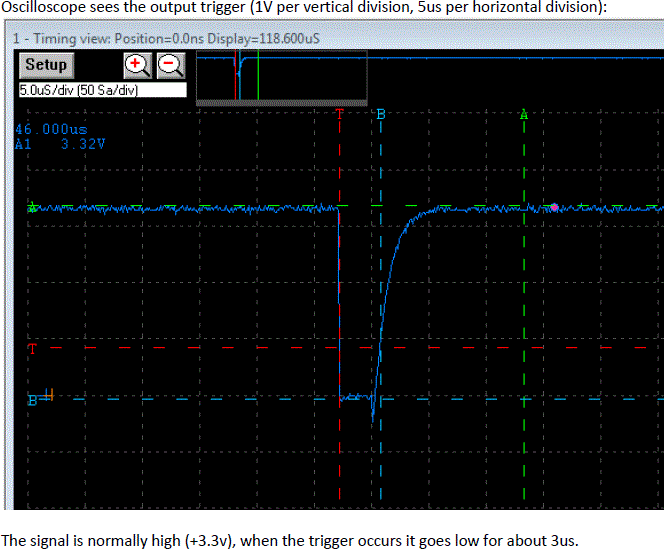
Creating an output trigger is relatively easy using AltaView, but the first thing to know is that the output signal pin is NOT common across all Alta products.
First, verify in your device hardware manual that you are using the correct pin to capture the output trigger signal.
Also, ensure that you are also connected to a reference ground on the output connector.
On a PMC-1553 card and checking the trigger with an oscilloscope, the following applies:
Connect the oscilloscope probe to Pin 32 of the DB50 AUX connector, and the ground clip to Pin 30.
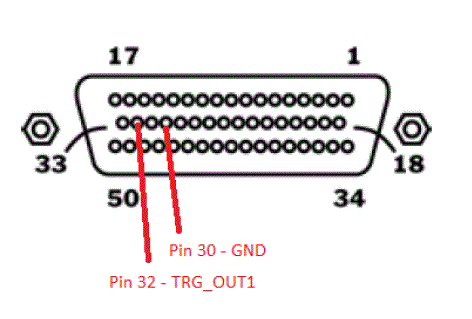
The easiest method to check the output trigger is then to set up AltaView as a Bus Controller and specify
within a message that you wish to generate the output trigger when that message is sent on the bus.
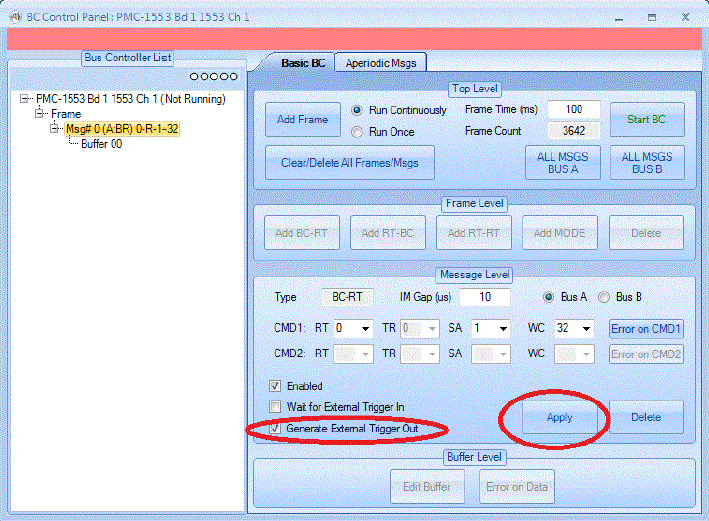
To do this, after you have started AltaView and opened your device, open the BC Control Panel.
Add one message to the frame – the default of 0-R-1-32 is okay (don’t worry about an RT response).
Enable the message to generate an output trigger, hit the “Apply” button, and start the BC, as shown here: