
Market Leader in 1553 & ARINC Interface Cards and Real-Time Appliances

I get ADT_L1 linker errors when I try to build an example program for 64-bit Windows.

Welcome to the Alta Customer Download Area

Please Click on a Link Below…
Contact us at 888-429-1553 x2 or [email protected] for any questions.
By entering the download section, you agree to Alta Terms and Conditions, Warranties, and Cookies.
See Company/Polices and /Legal for more information.
Please let us know how we’re doing with a Survey!

Home / Article / I get ADT_L1 linker errors when I try to build an example program for 64-bit Windows.

In Microsoft Studio, what could be happening is that your solution target is set up for a Win32 project, which is the default (even on a 64-bit OS).

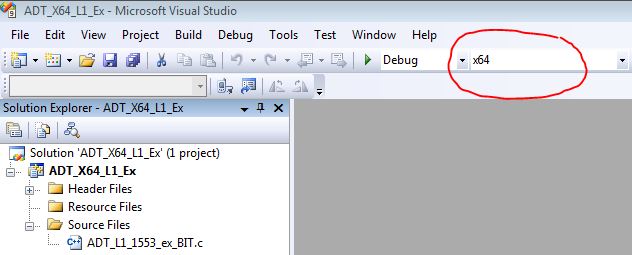
Make sure that your active solution target is set for X64. This is selected from the MS Studio Configuration Manager within the IDE. If you do not have an x64 target, that just means that your MS Studio has never been used for that type of project, and you have to create one in the Configuration Manager->New tab.

The image below shows a proper Debug/x64 project in the MS Studio status bar.
Related Articles

This page requires users to be registered and logged in.

WELCOME BACK!

Below are the products that are in your cart. If you wish to remove any, please uncheck the corresponding checkbox.

Remove All sales request form

Your Cart

Below are the products that are in your cart. If you wish to remove any, please uncheck the corresponding checkbox.

Remove All sales request form

Alta Selected for Prestigious Award as Top Supplier & Technology Innovator

The Recognized Leader in 1553 & ARINC Interface Cards,
Real-Time Ethernet Converters, USB and Thunderbolt Appliances

MIL-STD-1553 and ARINC Top Products and Quality. Interface Boards, Ethernet Converters and USB Appliances